How to Train an AI Chatbot on Your Website Content

Sara Williams
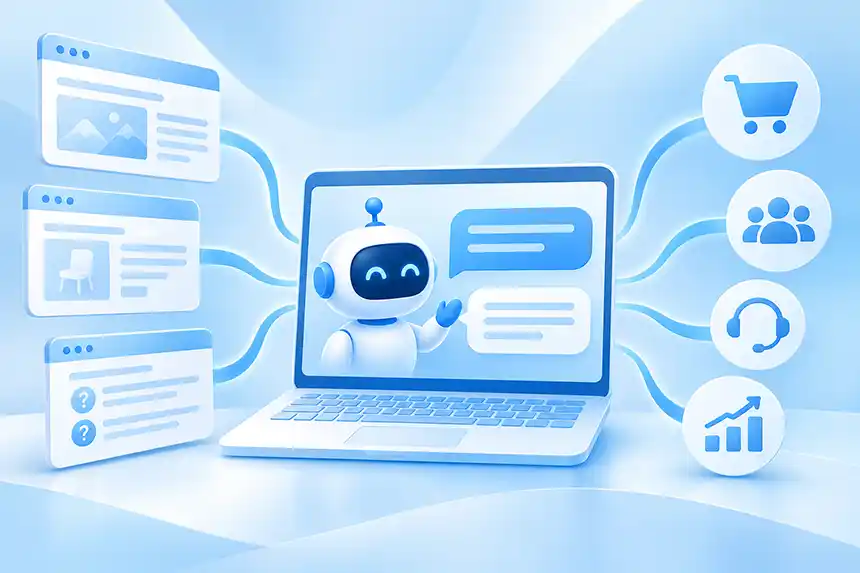
Your website already contains a tremendous amount of knowledge about your business. Product descriptions, service pages, FAQs, documentation, pricing information, support articles, and company policies all exist to help visitors understand what you offer and find the information they need.
The problem is that visitors still have to find that information themselves.
They navigate menus, search for keywords, browse pages, read documentation, and sometimes contact your sales or support team simply because they can't locate an answer that's already published somewhere on your website.
What if visitors could simply ask your website a question and get an immediate, accurate answer?
That's the idea behind training an AI chatbot on your website content. Instead of requiring visitors to navigate your website's information architecture, you can give them a conversational interface that understands questions in natural language and uses your existing content to provide relevant answers.
And thanks to modern AI technology, you don't need to build your own AI model, hire machine learning engineers, or write complicated software to make it happen.
In this guide, we'll explain how to train an AI chatbot on your website content, how the technology works, and how to build an accurate, useful conversational experience using a platform like CrafterQ.
What Does It Mean to Train an AI Chatbot on Your Website?
When people talk about training an AI chatbot on their website, they usually don't mean training an artificial intelligence model from scratch.
Training a large language model (LLM) requires enormous amounts of data, specialized infrastructure, and significant computing resources. That's how companies such as OpenAI develop the foundational AI models that power modern conversational applications.
Fortunately, businesses don't need to do any of that.
Instead, modern AI chatbot platforms allow you to connect an existing language model to your own business information. The chatbot can then use that knowledge to answer questions about your products, services, policies, documentation, and other website content.
This approach is commonly called retrieval-augmented generation, or RAG.
With RAG, the AI doesn't have to memorize every page of your website. Instead, when a visitor asks a question, the system searches your knowledge sources for relevant information and provides that context to the language model, which generates a natural-language response.
For example, imagine a visitor asks a software company's website, "Does your product support single sign-on with Okta?"
The AI chatbot can search the company's product documentation, identify relevant information about supported authentication methods, and generate an answer based on that documentation. If the information is available and accurately retrieved, the chatbot can answer without requiring the visitor to locate and read the documentation themselves.
This distinction matters because it changes how businesses should think about AI chatbot training.
You're not teaching an AI model everything about your business. You're giving an existing AI model access to the knowledge it needs to answer questions about your business.
That makes the process much faster, more affordable, and easier to maintain than traditional model training.
For a broader introduction to website AI, see our guide: AI Chatbots for Websites: The Complete Guide.
Step 1: Identify the Website Content Your Chatbot Needs
Before creating your chatbot, consider what information visitors are most likely to ask about.
For most businesses, the answers already exist across multiple areas of the website. Product pages describe features and capabilities. Service pages explain what the company offers. FAQs address common questions. Documentation provides technical details. Pricing pages explain plans and packages, while policies cover shipping, returns, warranties, and other important terms.
All of this information can potentially become part of your chatbot's knowledge base.
However, more content isn't automatically better.
If your website contains outdated information, contradictory statements, incomplete product descriptions, or pages that are no longer relevant, importing everything without reviewing it can create problems. An AI chatbot can only provide reliable answers when it has access to reliable information.
Start by identifying the content that matters most to your visitors. Think about the questions your sales and support teams answer repeatedly. Consider what prospective customers need to know before making a purchase, what existing customers need help understanding, and what information visitors frequently struggle to find.
For an e-commerce business, this might include product specifications, compatibility information, sizing guides, shipping policies, and returns. For a B2B software company, it might include product features, integrations, pricing, security documentation, and implementation requirements.
The objective is to create a useful foundation of business knowledge that supports the conversations you want your AI chatbot to handle.
Step 2: Add Your Website as a Knowledge Source
Once you've identified the information your chatbot needs, the next step is to make that content available to the AI.
One of the easiest ways to accomplish this is through website crawling.
A website crawler visits publicly accessible pages, extracts relevant content, and makes that information available to the chatbot's knowledge system. Rather than manually copying and pasting every product description, FAQ, or support article, you can use the content you've already published.
CrafterQ makes this process straightforward. You can create an AI agent, add your website as a knowledge source, and let CrafterQ crawl the site to collect content for the agent to use when answering questions.
This is especially useful because most businesses have already invested considerable effort in organizing and maintaining their website content. That information doesn't need to be recreated for AI. It needs to be made accessible through a different interface.
Of course, not every website is equally easy to crawl. Some content may require authentication, be generated dynamically, or exist in formats that aren't readily accessible to a crawler. Important information may also be missing from public pages.
That's why it's worth reviewing what the crawler actually captured rather than assuming every page and every piece of information was imported perfectly.
The quality of your chatbot depends partly on the completeness and accuracy of the knowledge available to it.
Step 3: Add Documents, FAQs, and Other Business Knowledge
Your website may be the primary source of information, but it probably isn't the only one.
Many businesses have valuable knowledge stored in PDFs, product manuals, technical specifications, spreadsheets, policy documents, and other files. Some of this information may not be published as regular website pages.
A good AI chatbot platform should allow you to supplement website content with additional knowledge sources.
CrafterQ supports multiple types of knowledge sources, including website content, PDFs, text, spreadsheets, and manually entered questions and answers. This allows you to build a more complete knowledge base without having to publish every document as a web page.
For example, an equipment manufacturer might combine its public product catalog with detailed PDF installation guides and technical specifications. A professional services company might supplement its website with service descriptions and frequently asked questions. An e-commerce store might add product information and policy documents that help answer common pre-purchase questions.
Manually entered Q&A pairs can be particularly useful when a question comes up frequently but the answer isn't clearly explained elsewhere. However, adding more sources also introduces the possibility of conflicting information. If your website says one thing and an older PDF says another, the AI may encounter inconsistent guidance.
Make sure your knowledge sources are current, authoritative, and reasonably consistent. When information changes, update the underlying content rather than relying on the chatbot to work around outdated material.
Step 4: Configure Your Chatbot's Personality and Instructions
Giving an AI chatbot access to business knowledge is only part of the setup process.
You also need to define how it should behave.
The information available to the chatbot helps determine what it knows. Its instructions help determine how it communicates, what role it plays, and how it should respond in different situations.
For example, a chatbot on a technical documentation website might be instructed to provide detailed explanations and reference relevant documentation. An AI shopping assistant might use a more conversational tone, ask clarifying questions, and help shoppers compare products. An agent on a professional services website might focus on explaining services and guiding visitors toward an appropriate next step.
CrafterQ allows you to customize your agent's personality, instructions, and communication style so the experience fits your business and audience.
It's also important to establish boundaries. Your chatbot should know how to handle questions that fall outside its available knowledge. It shouldn't invent product capabilities, make unsupported promises, or confidently answer questions when the relevant information isn't available.
For some businesses, a concise answer is ideal. For others, visitors may benefit from more detailed explanations. CrafterQ's configurable expressiveness settings can help tailor the response style to the experience you want to provide.
The goal is to create an AI agent that communicates naturally while remaining grounded in your business knowledge.
Step 5: Test Your AI Chatbot With Real Customer Questions
One of the biggest mistakes businesses make when deploying AI chatbots is assuming that successful setup means the chatbot is ready for production.
Creating an agent and importing content may be quick. Making sure it answers reliably requires testing.
The best place to start is with questions your customers already ask. Review sales inquiries, support tickets, website searches, email conversations, and frequently asked questions. These provide a realistic picture of what visitors want to know and how they express those needs.
Then ask your chatbot those questions.
Start with straightforward requests whose answers are clearly documented. If your website explains your return policy, ask the chatbot about returns. If your product documentation describes a particular integration, ask whether the integration is supported.
Next, try more difficult questions.
Ask questions that require information from multiple sources. Ask follow-up questions that depend on the previous conversation. Use terminology that differs from the wording on your website. Ask vague questions that require clarification.
You should also deliberately test questions the chatbot shouldn't be able to answer. For example, if your website doesn't provide a particular product specification, ask for it anyway. If your company doesn't offer a certain service, see whether the chatbot correctly identifies that limitation rather than inventing an offering.
These tests help you understand how the AI behaves when the available information is incomplete or ambiguous.
A chatbot that answers five carefully selected demo questions correctly isn't necessarily ready to handle real visitors.
Testing should reflect the variety, unpredictability, and occasional confusion of actual customer conversations.
Step 6: Improve Accuracy and Reduce AI Hallucinations
Accuracy is one of the most important considerations when training an AI chatbot on business content.
Large language models can generate fluent, convincing responses even when they lack sufficient information. This behavior is commonly referred to as an AI hallucination.
For a business website, hallucinations can create real problems. An AI chatbot might incorrectly describe a product feature, misstate a policy, invent pricing information, or recommend a product that doesn't meet the customer's requirements. RAG helps reduce these risks by grounding answers in relevant business information, but it doesn't eliminate them entirely.
Several factors influence accuracy, including the quality of the source content, how effectively the system retrieves relevant information, the instructions provided to the model, and how the AI handles uncertainty.
When a chatbot produces an incorrect answer, the first step should be understanding why. Perhaps the answer doesn't exist in the knowledge base. Perhaps the relevant information wasn't retrieved. Maybe the source material is ambiguous or contradictory. Or perhaps the AI generated a conclusion that wasn't adequately supported by the information it received.
These are different problems, and they require different solutions.
CrafterQ provides diagnostic information that can help you evaluate responses, including the source content used to generate answers and confidence-related indicators. Reviewing this information can help identify whether a problem originates in the knowledge sources, retrieval process, or response generation.
The important principle is to improve the underlying cause rather than simply trying to make the AI sound more confident.
A reliable chatbot should provide useful answers when information is available and acknowledge uncertainty when it isn't.
Step 7: Deploy Your AI Chatbot on Your Website
Once your chatbot is trained, configured, and tested, it's time to make it available to visitors. Modern no-code AI platforms make deployment considerably easier than building a custom conversational application.
With CrafterQ, you can deploy your agent through a JavaScript embed on your website or provide access through a standalone conversational experience. This allows businesses to add AI without rebuilding their existing website or developing a custom chatbot interface from scratch.
An important consideration is how prominently you want the chatbot to appear.
The traditional approach is a small chat bubble in the lower corner of the website. This is familiar to visitors and keeps the interface unobtrusive until someone wants assistance. CrafterQ also offers Conversational Mode, which makes the opportunity to ask a question a more visible part of the website experience. This distinction matters because an AI chatbot can only provide value when visitors actually use it.
We've seen CrafterQ Conversational Mode drive up to three times more engagement than traditional Bubble Mode. By making the conversational entry point more prominent, websites can encourage more visitors to ask questions rather than waiting for them to discover a chatbot icon.
The best presentation depends on your website and objectives. A support-focused experience may work well as a traditional chat bubble, while a website focused on product discovery, lead generation, or content exploration may benefit from a more prominent conversational interface.
Step 8: Monitor Conversations and Continuously Improve
Launching your AI chatbot isn't the end of the process.
In many ways, it's the beginning of the most interesting part. Once real visitors start asking questions, you'll begin learning things that traditional website analytics don't always reveal.
Website analytics can tell you which pages people visited, how long they stayed, and where they clicked. AI conversations provide something different: visitors explicitly tell you what they're looking for.
They ask about products they can't find, features they don't understand, policies that seem confusing, and information that may be missing from your website. These conversations can become a valuable source of customer insight.
CrafterQ Chat Logs allow you to review conversations and identify patterns. Look for frequently asked questions, unanswered requests, confusing responses, and opportunities to improve your content.
Suppose visitors repeatedly ask whether a product supports a particular integration, but your chatbot struggles to answer. The immediate solution may be to add better information to the knowledge base.
The more valuable solution may be to improve the product documentation itself. That way, both the chatbot and visitors who browse the website normally benefit from the improved information.
Over time, this creates a continuous improvement process in which visitor questions reveal content gaps, the business improves its knowledge, and the AI becomes more effective at helping future visitors.
Your chatbot isn't just another way to deliver information. It can also help you understand what information your website needs.
Common Mistakes When Training an AI Chatbot
One common mistake is assuming that importing a website automatically creates an accurate AI assistant. Website crawling makes knowledge collection easier, but it doesn't guarantee that the underlying information is complete, current, or consistent.
Another mistake is relying too heavily on instructions to compensate for missing knowledge. Instructions can guide how an AI behaves, but they cannot reliably supply factual information that doesn't exist in the agent's sources.
Businesses also sometimes test only simple questions. This can create a false sense of confidence because real visitors rarely behave like carefully prepared demonstration scripts. They ask vague questions, combine multiple topics, use unexpected terminology, and sometimes request information the business doesn't provide.
Finally, some businesses deploy an AI chatbot and never review its conversations again.
That's a missed opportunity. Customer needs change, product information evolves, and new questions emerge. A chatbot that isn't maintained can become less useful over time, particularly if its knowledge sources fall out of date.
The best implementations treat AI as an ongoing part of the website experience rather than a one-time software installation.
How Long Does It Take to Train an AI Chatbot on Your Website?
One of the biggest advantages of modern no-code AI chatbot platforms is how quickly you can get started.
With a platform like CrafterQ, creating an agent, adding a website knowledge source, and generating an initial conversational experience can take just minutes for a straightforward website.
That's dramatically different from traditional chatbot development, which often required designing conversation flows, defining intents, writing responses, building integrations, and maintaining extensive decision trees.
However, there's an important distinction between creating a chatbot and preparing it for real customers.
A small website with clear, well-organized content may require relatively little additional work. A large business with thousands of pages, complicated products, inconsistent documentation, and multiple knowledge sources may need more preparation and testing.
The time required depends less on the sophistication of the underlying AI model and more on the quality and complexity of the business knowledge you're making available.
The objective shouldn't be to launch the chatbot as quickly as possible.
It should be to launch a chatbot that visitors can rely on.
From AI Chatbot to Website AI Agent
Once you've trained an AI chatbot on your website content, you've created something valuable: a conversational interface to your business knowledge.
But answering questions is only the beginning.
Modern website AI is increasingly evolving from chatbots that provide information into AI agents that can also help visitors take action.
For example, a visitor might ask several questions about a product and then decide they want to speak with someone. Rather than ending the conversation with a generic contact page link, an AI agent can potentially capture the visitor's information and initiate the appropriate follow-up process.
Similarly, a support conversation may reach a point where human assistance is required. The AI can recognize that need and help escalate the interaction.
CrafterQ Actions support capabilities such as Lead Capture and Escalate to Human, helping connect conversations with business outcomes.
This is an important distinction because businesses don't ultimately want more chatbot conversations for their own sake. They want more visitors finding useful information, more qualified leads, better customer experiences, and fewer repetitive support requests.
Training the AI on your website content provides the knowledge foundation. Adding appropriate actions helps turn that knowledge into results.
For a related practical guide, see How to Automate Customer Support With AI.
Turn Your Website Content Into a Conversational AI Experience With CrafterQ
Your business has already invested in creating valuable website content. You've written product descriptions, documented services, published FAQs, created support resources, and organized information to help visitors understand what you offer.
CrafterQ helps you put that knowledge to work in a new way.
With CrafterQ, you can create an AI agent trained on your website and other business content without building your own AI model or writing custom software. You can supplement website information with documents and Q&A sources, customize the agent's personality and behavior, test its responses, and deploy it directly on your website.
Once it's live, you can review conversations, identify content gaps, improve answers, and use CrafterQ Actions to help turn visitor questions into meaningful business outcomes.
Whether your objective is better website engagement, more qualified leads, improved product discovery, or more efficient customer support, the foundation is the same: giving visitors a simple way to access the knowledge your business already has.
Your website already has the answers. CrafterQ makes it easier for visitors to ask the questions.