Drive 3x More Website Engagement With CrafterQ Conversational Mode

Amanda Lee

You added an AI agent to your website. You trained it on your content. It gives great answers. It's ready to help visitors.
There's just one problem. Most visitors never open it.
This is one of the fundamental challenges with the traditional chatbot experience. The familiar chat bubble in the lower corner of a website is unobtrusive and easy to deploy, but it also puts the burden on the visitor. They have to notice the bubble, understand what it does, decide they want help, click it, and then start a conversation.
Many never do. That's why we introduced Conversational Mode in CrafterQ.
Instead of hiding your AI agent behind a small chat bubble, Conversational Mode makes the invitation to engage with AI a visible part of the website experience. Visitors immediately see that they can ask a question, making it much more likely that they'll actually use the AI you've put there to help them.
We've seen up to 3x more engagement with CrafterQ Conversational Mode compared with traditional Bubble Mode.
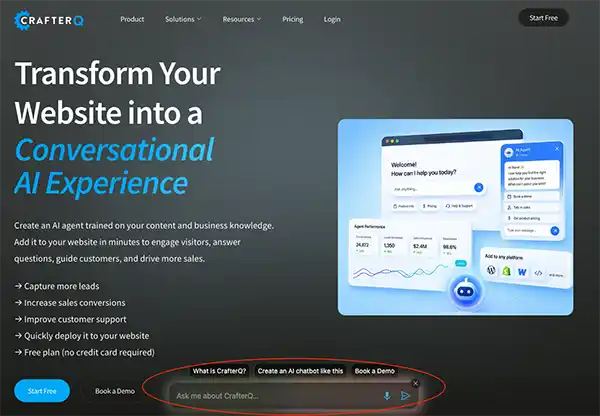 Figure 1. CrafterQ's website AI agent in Conversational Mode (circled in red)
The reason isn't complicated. If you want more visitors to engage with your website's AI, make the opportunity to engage obvious.
The Traditional Chat Bubble Has an Engagement Problem
The chat bubble became a standard website pattern for good reasons. It takes up very little screen space, stays out of the way until needed, and can provide access to live chat, customer support, or an AI assistant from almost anywhere on the site.
CrafterQ supports this experience with Bubble Mode, and there are plenty of situations where it's still the right choice. But the traditional bubble was designed around a particular assumption: the visitor already knows they want to chat.
That assumption made sense when chat primarily meant contacting a customer-support representative. Someone who couldn't find an answer might notice the bubble, click it, and ask for help.
AI changes the opportunity.
Your CrafterQ agent isn't simply a replacement for a "Contact Support" button. It can help visitors discover information, understand your products and services, compare options, answer buying questions, navigate complex content, find resources, get support, and take actions.
Those capabilities are useful to far more visitors than the small percentage who actively go looking for a chatbot. The challenge is getting them to try it.
Conversational Mode Makes AI Part of the Website
Conversational Mode changes the role of the AI from something hidden behind a widget into something visitors encounter directly as part of the website experience.
Rather than asking visitors to first discover a chat bubble, Conversational Mode presents a prominent conversational entry point that invites them to ask the website a question.
It's a relatively small interface change with an important behavioral consequence. The visitor doesn't have to think, "Maybe there's a chatbot here that can help me." The website is effectively saying, "What are you looking for? Ask me." That makes the capability immediately understandable.
Visitors don't need to know what an AI agent is, understand how the technology works, or decide whether they want to "chat with a bot." They simply need to have a question. And website visitors almost always have questions.
Why Conversational Mode Can Drive 3x More Engagement
The increase in engagement we've seen with Conversational Mode isn't because the underlying AI suddenly became three times smarter. The same CrafterQ agent can power both experiences.
What changes is discoverability.
With Bubble Mode (the traditional lower corner chat icon), the visitor has to initiate the interaction by noticing and opening the chatbot. With Conversational Mode, the website itself presents conversation as one of the primary ways to engage.
Think about the difference between placing a search box prominently at the top of a website and hiding search behind a small icon in the corner. The underlying search engine could be identical, but the way the capability is presented will influence how often people use it.
Conversational AI works the same way. When the ability to ask a question is visible and obvious, more people ask questions.
That matters because the value of your AI agent only begins once the conversation starts. A perfectly trained agent that nobody opens can't answer a buying question, discover a lead, reduce a support request, or help a visitor find what they're looking for.
Engagement is the gateway to everything else the agent can do.
You're Not Trying to Get Visitors to "Use a Chatbot"
There's another reason we like the Conversational Mode approach.
Most website visitors don't arrive because they want to use your chatbot. They arrive because they want something.
They may want to understand what your company does. They may be evaluating a product. They may want pricing information. They may be looking for documentation. They may have a support problem. They may be trying to determine whether your product works with something they already use.
The chatbot itself isn't the destination. It's an interface for getting an answer.
That distinction should influence how you present AI on the website. A small icon that says "chat" emphasizes the mechanism. A prominent conversational experience emphasizes what the visitor can accomplish with it.
The objective isn't to convince visitors to have a conversation with AI. It's to make asking easier than searching.
Make the Invitation to Ask Obvious
One of the simplest lessons we've learned from deploying website AI is that visitors need to understand what they can do with it.
A generic chat icon provides very little context. Even a label such as "Chat with us" can suggest live customer service rather than an AI agent capable of answering questions about the entire website.
Conversational Mode gives you more room to set the expectation.
The Welcome Message can explain what the agent knows and how it can help. Instead of a generic greeting, you can tell visitors that they can ask about products, pricing, services, documentation, policies, or whatever is most relevant to your business.
The exact message should reflect the website. An e-commerce store might encourage shoppers to ask for help finding the right product. A B2B software company might invite questions about features, integrations, pricing, or use cases. A university might offer help with programs, admissions, deadlines, and campus information.
The best invitation isn't "Talk to our AI." It's an invitation to accomplish something the visitor already came to the website to do.
Use Quick Messages to Remove the Blank-Box Problem
Even when visitors understand that they can ask a question, some won't immediately know what to ask.
This is the same problem people encounter with any open-ended AI interface. A blank input box offers unlimited possibilities, but unlimited possibilities can also create hesitation.
CrafterQ Quick Messages can help. Quick Messages give visitors examples of useful things they can ask. They can highlight common questions, important content, popular use cases, or high-value paths through the website.
For an e-commerce site, those might revolve around finding a product, comparing options, or understanding shipping and returns. For a SaaS website, they might focus on pricing, integrations, implementation, or whether the product fits a particular use case.
The goal isn't to turn the AI into a decision-tree chatbot. Visitors should still be able to ask anything naturally. Quick Messages simply help start the conversation.
Once someone experiences a useful answer, the interaction becomes intuitive. They understand that they can continue asking questions in their own words.
Put Conversational Mode Where Visitor Intent Is Highest
More visibility doesn't necessarily mean putting the same experience everywhere without thinking about context.
Consider where visitors are most likely to have questions. A pricing page is an obvious example. Visitors there may want to understand plan differences, features, limits, implementation, or which option fits their needs.
Product and service pages are another. Visitors may be evaluating alternatives or trying to determine whether something fits a particular requirement.
Documentation, resource centers, and content-heavy websites can benefit because visitors frequently know what they're trying to learn without knowing where the answer is located.
The home page can also be particularly powerful because it allows visitors to bypass traditional navigation entirely. Someone arriving with a specific question doesn't necessarily need to understand your information architecture before getting an answer.
Conversational Mode can effectively become another front door into the website.
Let Your Agent Do More Than Answer Questions
Increasing engagement is useful, but conversation volume isn't the ultimate objective. The real value comes from what happens during those conversations.
A visitor asking a product question may be showing buying intent. Someone asking about pricing may be a potential lead. A customer asking a complex support question may need a human. Another visitor may simply need help finding information buried somewhere on the website.
CrafterQ Actions allow the agent to move beyond answering questions when appropriate.
For example, the agent can use AI Actions. For example, Lead Capture to collect contact information when a visitor is ready for follow-up. It can use Escalate to Human when the conversation requires someone from your team.
This is where higher engagement can become more meaningful than a vanity metric.
More conversations create more opportunities for the AI to help visitors reach actual outcomes.
Customize the Experience to Your Website
Conversational Mode works best when it feels like part of the website rather than a third-party tool bolted onto it.
That includes visual branding, but it also includes the personality and behavior of the agent. The agent should understand the role it's supposed to play. A technical documentation assistant should behave differently from an e-commerce shopping assistant. A B2B sales-oriented agent should understand different visitor needs than an agent on a customer-support portal.
CrafterQ lets you customize your agent's instructions, personality, welcome experience, and visual presentation so the conversation matches the context in which it's being used. This matters because increasing engagement is only useful if the experience visitors encounter after engaging is good.
Discoverability gets the conversation started. Relevance keeps it going.
Train the Agent Before You Promote It
Making your AI more prominent also means more visitors will test it. That's a good thing, but it makes preparation important.
Before switching to a highly visible conversational experience, make sure your agent is trained on the content visitors are likely to ask about. Test the questions your sales and support teams hear repeatedly. Ask about products, pricing, policies, services, integrations, and edge cases.
Pay particular attention to questions the agent can't answer. Sometimes that means the AI needs better instructions. Sometimes the source content needs improvement. Sometimes the answer simply doesn't exist on the website yet.
Those failures are useful because they identify what needs attention before more visitors encounter the same issue.
A prominent AI experience raises expectations. Make sure the agent is ready for the attention you're trying to generate.
Review Conversations and Learn What Visitors Want
Once Conversational Mode begins generating more engagement, the conversations themselves become valuable.
Website analytics tell you what visitors clicked. Conversations tell you what they wanted.
Review your CrafterQ Chat Logs regularly. Look for questions that appear repeatedly. Identify answers that could be improved. Notice where visitors seem confused. Pay attention to buying questions, support issues, missing information, and requests for products or capabilities you don't currently offer.
This is one of the reasons we believe conversational websites are so interesting.
For decades, website analytics have largely been behavioral. We infer intent from page views, clicks, searches, bounce rates, and conversion paths. Conversation gives visitors a way to state their intent directly.
If increasing engagement produces more of those conversations, you're not just helping more visitors. You're also learning more about them.
Conversational Mode vs. Bubble Mode: Which Should You Use?
Conversational Mode isn't automatically the right answer for every website or every page.
Bubble Mode remains useful when you want AI assistance to be available without becoming a prominent part of the page. It can be a good fit for websites where chat is primarily a secondary support channel or where the existing design leaves little room for a more visible conversational experience.
Conversational Mode is the stronger choice when you want the AI agent to play an active role in the visitor experience.
If your objective is product discovery, lead generation, visitor engagement, content discovery, buying assistance, or helping people navigate a complex website, making the AI visible gives it a much better opportunity to do its job.
The two modes aren't really about different AI capabilities. They're about how prominently you want to invite visitors into the conversation.
Measure More Than Messages
We've seen Conversational Mode drive up to 3x more engagement than Bubble Mode, but engagement should be the beginning of the measurement conversation, not the end. More messages aren't automatically more valuable.
Look at what visitors are doing with those conversations. Are they asking meaningful questions? Are they finding information? Are conversations revealing sales opportunities? Are visitors providing contact information? Are support questions being resolved? Are people discovering content or products they otherwise might have missed?
The objective isn't to maximize chatbot usage for its own sake. It's to increase the number of visitors your website successfully helps.
That's a much more useful definition of engagement.
Your AI Agent Can't Help Visitors Who Never Open It
Adding AI to a website is only the first step.
You can train an excellent agent, give it access to comprehensive content, carefully tune its instructions, and configure useful Actions. But none of that matters to a visitor who never realizes the agent is there.
Bubble Mode gives visitors access to AI. Conversational Mode invites them to use it.
That distinction sounds small, but we've seen it produce a significant difference in engagement.
If your CrafterQ agent (or any other website AI chatbot) is currently running in Bubble Mode, try Conversational Mode and compare the results for yourself. Pay attention not only to how many conversations you generate, but also to what visitors ask once you give them a more obvious way to ask.
You may discover that your website visitors had a lot more questions than you thought.
Don't hide your best answers behind a bubble. Put conversation at the center of the website.
Try CrafterQ for Free
See how a CrafterQ AI agent can drive better engagement on your website by signing up for a free account today.